Overview
PeerLLM exposes an OpenAI-compatible REST API so you can use any OpenAI SDK or HTTP client to interact with the PeerLLM network. Requests are routed to distributed community hosts running open-weight models, or to LLooMA1.0 — PeerLLM's network-native orchestration model that splits complex tasks across multiple hosts in parallel.
You can access PeerLLM in three ways:
- Remote API — Connect to the public PeerLLM cloud at
https://api.peerllm.com - Network API — Connect to a PeerLLM host on your local network
- Local Development — Connect to a PeerLLM host running on your own machine
Remote API
The Remote API connects you to the public PeerLLM cloud. This is the recommended way to use PeerLLM for production applications.
Base URL
https://api.peerllm.comAll endpoints are prefixed with /v1.
Authentication
Every request must include a valid API key in the Authorization header:
Authorization: Bearer <YOUR_API_KEY>Generating an API Key
- Go to the Hosts Portal at hosts.peerllm.com.
- Sign in or create an account.
- Navigate to the API Management section.
- Click Generate New Key.
- Copy and securely store your key — it will not be shown again.
Tokens & Billing
PeerLLM uses a token balance system. You must have a positive token balance before you can make API calls.
How to Get Tokens
| Method | Steps |
|---|---|
| Purchase | Go to hosts.peerllm.com → API Management → click Purchase Tokens and select a package and complete payment. |
| Redeem a Token Code | Go to hosts.peerllm.com → API Management → Redeem Code → enter your code. |
If your balance reaches zero, all /v1/chat/completions requests will be rejected with a 402 Payment Required error until you add more tokens.
Endpoints
GET /v1/models
Returns the list of all approved models currently available on the PeerLLM network.
Request
GET /v1/models HTTP/1.1
Host: api.peerllm.com
Response 200 OK
{
  "object": "list",
  "data": [
    {
      "id": "LLooMA1.0",
      "object": "model",
      "created": 1776572039,
      "owned_by": "peerllm",
      "metadata": {
        "source": "orchestration",
        "repo": null,
        "file": null,
        "qtype": null,
        "size": null,
        "ram": null,
        "gpu": null,
        "checksum": null,
        "description": "LLooMA Orchestration Model - Centralized AI orchestration with distributed execution across PeerLLM hosts. Automatically splits complex tasks into parallel subtasks for optimal performance."
      }
    },
    {
      "id": "mistral-7b-instruct-v0.2.Q8_0",
      "object": "model",
      "created": 1776572039,
      "owned_by": "peerllm",
      "metadata": {
        "source": "huggingface",
        "repo": "TheBloke/Mistral-7B-Instruct-v0.2-GGUF",
        "file": "mistral-7b-instruct-v0.2.Q8_0.gguf",
        "qtype": "Q8_0",
        "size": 7241732096,
        "ram": "16GB+",
        "gpu": "RTX 4060 or higher",
        "checksum": "sha256:3a6fbf4a41a1d52e415a4958cde6856d34b2db93",
        "description": "Quantized Mistral 7B Instruct v0.2 model hosted by TheBloke. Improved reasoning, context depth (32K tokens), and conversational performance."
      }
    }
  ]
}
Model Metadata Fields
| Field | Type | Description |
|---|---|---|
id | string | The model identifier — use this value in the model field of chat completions. |
object | string | Always "model". |
created | integer | Unix timestamp. |
owned_by | string | "owner of model". |
metadata.source | string | Origin of the model ("huggingface", "orchestration", etc.). |
metadata.repo | string? | Source repository (e.g., HuggingFace repo). |
metadata.file | string? | Model filename. |
metadata.qtype | string? | Quantization type (e.g., Q8_0, Q4_K_M). |
metadata.size | integer? | Model file size in bytes. |
metadata.ram | string? | Recommended RAM. |
metadata.gpu | string? | GPU requirement. |
metadata.checksum | string? | File checksum for integrity verification. |
metadata.description | string? | Human-readable model description. |
POST /v1/chat/completions
Send a chat completion request. Supports both streaming (stream: true, the default) and non-streaming (stream: false) modes.
Request
POST /v1/chat/completions HTTP/1.1
Host: api.peerllm.com
Authorization: Bearer <YOUR_API_KEY>
Content-Type: application/json

{
  "model": "LLooMA1.0",
  "messages": [
    { "role": "system", "content": "You are a helpful assistant." },
    { "role": "user", "content": "Explain quantum computing in simple terms." }
  ],
  "stream": true,
  "temperature": 0.7,
  "max_tokens": 1024
}
Request Body
| Field | Type | Required | Default | Description |
|---|---|---|---|---|
model | string | Yes | — | Model ID from /v1/models. Use "LLooMA1.0" for orchestrated multi-host responses. |
messages | array | Yes | — | Array of message objects with role ("system", "user", "assistant") and content. |
stream | boolean | No | true | Whether to stream the response via SSE. |
temperature | number | No | null | Sampling temperature (0.0–2.0). |
max_tokens | number | No | null | Maximum tokens to generate. |
Non-Streaming Response 200 OK
{
  "id": "chatcmpl-abc123",
  "object": "chat.completion",
  "created": 1750000000,
  "model": "LLooMA1.0",
  "choices": [
    {
      "index": 0,
      "message": {
        "role": "assistant",
        "content": "Quantum computing uses qubits..."
      },
      "finish_reason": "stop"
    }
  ],
  "usage": {
    "prompt_tokens": 25,
    "completion_tokens": 150,
    "total_tokens": 175
  }
}
Streaming Response 200 OK
The response is sent as Server-Sent Events (text/event-stream). Each event contains a JSON chunk:
data: {"id":"chatcmpl-abc123","object":"chat.completion.chunk","created":1750000000,"model":"LLooMA1.0","choices":[{"index":0,"delta":{"role":"assistant","content":"Quantum"},"finish_reason":null}]}

data: {"id":"chatcmpl-abc123","object":"chat.completion.chunk","created":1750000000,"model":"LLooMA1.0","choices":[{"index":0,"delta":{"content":" computing"},"finish_reason":null}]}

...

data: [DONE]
About LLooMA1.0
LLooMA1.0 is a network-native orchestration model. It does not run on any single host. Instead, it:
- Analyzes your prompt and determines if it can be split into parallel subtasks.
- If splittable, it distributes subtasks across multiple PeerLLM hosts and synthesizes the results.
- If not splittable, it races two PeerLLM hosts and uses the fastest response. Strict latency enforcement (1 s first-token deadline, 1 s inter-token timeout, 5 s total cap) ensures quality — if hosts are slow, a centralized AI fallback kicks in automatically.
For all other model IDs, the request is sent directly to a host running that specific model.
Error Reference
All errors follow a consistent JSON structure:
{
  "error": "Error message string"
}
Or in some cases the OpenAI-style structured format:
{
  "error": {
    "message": "Detailed error message",
    "type": "error_type",
    "code": "error_code"
  }
}| HTTP Status | Error | Cause | Resolution |
|---|---|---|---|
| 400 | "Missing model name." |
The model field is empty or missing. |
Provide a valid model ID. |
| 400 | "Unknown model '{model}'." |
The requested model is not in the PeerLLM catalog. Does not apply to LLooMA1.0. |
Call GET /v1/models to see available models. |
| 400 | "Missing messages." |
The messages array is null or empty. |
Provide at least one message with role "user". |
| 401 | "Invalid or expired API key." |
The Authorization header is missing or the key is invalid/expired. |
Generate a new API key at hosts.peerllm.com. |
| 402 | "Insufficient token balance." |
Your account's token balance is zero or negative. | Purchase tokens or redeem a code at hosts.peerllm.com. |
| 404 | "No hosts available." |
No PeerLLM hosts are online for the requested model. | Try again later, or use LLooMA1.0 which has centralized AI fallback. |
| 500 | "Failed to process request with centralized AI." |
The centralized AI fallback encountered an internal error. | Retry the request. If persistent, check PeerLLM status. |
Quick Start
Using curl
# List available models
curl https://api.peerllm.com/v1/models

# Chat completion (streaming)
curl https://api.peerllm.com/v1/chat/completions \
  -H "Authorization: Bearer YOUR_API_KEY" \
  -H "Content-Type: application/json" \
  -d '{
    "model": "LLooMA1.0",
    "messages": [{"role": "user", "content": "Hello!"}],
    "stream": true
  }'
Using an OpenAI SDK
from openai import OpenAI

client = OpenAI(
    api_key="YOUR_API_KEY",
    base_url="https://api.peerllm.com/v1"
)

response = client.chat.completions.create(
    model="LLooMA1.0",
    messages=[
        {"role": "user", "content": "What is PeerLLM?"}
    ],
    stream=True
)

for chunk in response:
    if chunk.choices[0].delta.content:
        print(chunk.choices[0].delta.content, end="")
import OpenAI from "openai";
const client = new OpenAI({
apiKey: "YOUR_API_KEY",
baseURL: "https://api.peerllm.com/v1",
});
const stream = await client.chat.completions.create({
model: "LLooMA1.0",
messages: [{ role: "user", content: "What is PeerLLM?" }],
stream: true,
});
for await (const chunk of stream) {
process.stdout.write(chunk.choices[0]?.delta?.content || "");
}using OpenAI;
using OpenAI.Chat;
var client = new ChatClient(
model: "LLooMA1.0",
credential: new ApiKeyCredential("YOUR_API_KEY"),
options: new OpenAIClientOptions
{
Endpoint = new Uri("https://api.peerllm.com/v1")
});
var stream = client.CompleteChatStreamingAsync(
new List<ChatMessage>
{
new UserChatMessage("What is PeerLLM?")
});
await foreach (var update in stream)
{
foreach (var part in update.ContentUpdate)
{
Console.Write(part.Text);
}
}using System.Text;
using System.Threading.Tasks;
using Microsoft.SemanticKernel;
using Microsoft.SemanticKernel.ChatCompletion;
namespace PeerLLM.Demos.SemanticKernel
{
internal class Program
{
static async Task Main(string[] args)
{
var builder = Kernel.CreateBuilder();
builder.AddOpenAIChatCompletion(
modelId: "LLooMA1.0",
apiKey: "YOUR_API_KEY",
endpoint: new Uri("https://api.peerllm.com/v1"));
var kernel = builder.Build();
var chat = kernel.GetRequiredService<IChatCompletionService>();
var chatHistory = new ChatHistory();
var fullResponse = new StringBuilder();
chatHistory.AddUserMessage("What is PeerLLM?");
await foreach (var message in chat.GetStreamingChatMessageContentsAsync(
chatHistory,
kernel: kernel))
{
Console.Write(message.ToString());
fullResponse.Append(message.ToString());
}
}
}
}Network API
The Network API allows you to connect to a PeerLLM host running on your local network. This is useful for:
- Accessing models running on a dedicated machine in your home or office
- Leveraging powerful hardware without cloud costs
- Keeping data local and private
Enable Server Capabilities
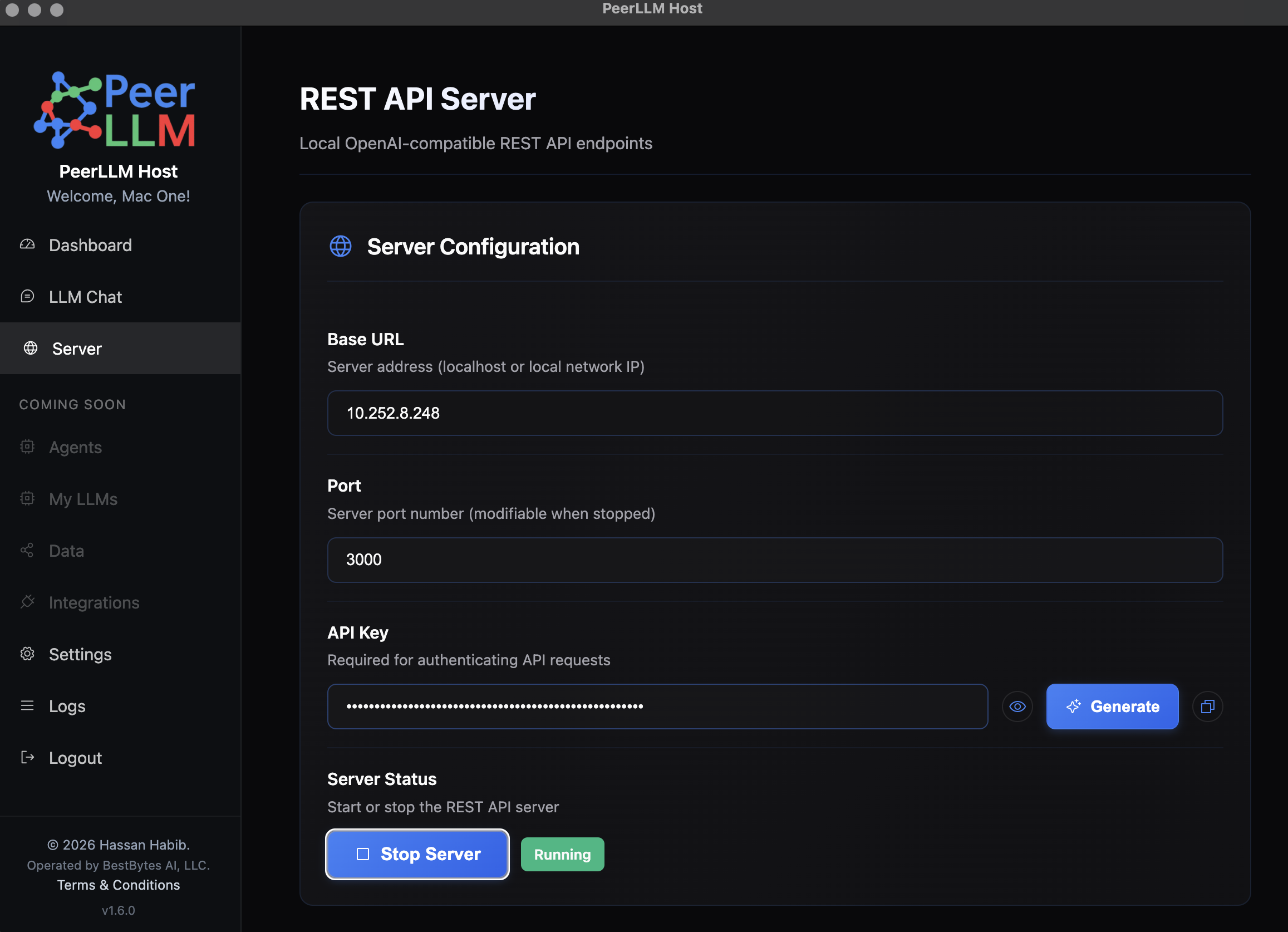
- Open the PeerLLM application on the host machine.
- Navigate to Server.
- Click Start Server
- Note the port number (default is usually
3000or similar).
Generate API Key
- In the PeerLLM application, go to Settings → API Management.
- Click Generate New Key.
- Copy and securely store your key — you'll need it to authenticate requests.
Find Your IP Address
To connect to the host from another device on your network, you need the host's local IP address.
On macOS/Linux
ifconfig | grep "inet " | grep -v 127.0.0.1Look for an address like 192.168.1.x or 10.0.0.x.
On Windows
ipconfigLook for the IPv4 Address under your active network adapter (e.g., 192.168.1.x).
Usage
Once you have the IP address and port, construct the base URL:
http://<HOST_IP>:<PORT>For example:
http://192.168.1.100:3000Then use it with any OpenAI SDK or HTTP client:
from openai import OpenAI

client = OpenAI(
    api_key="YOUR_API_KEY",
    base_url="http://192.168.1.100:3000/v1"
)

response = client.chat.completions.create(
    model="LLooMA1.0",
    messages=[
        {"role": "user", "content": "Hello from my network!"}
    ],
    stream=True
)

for chunk in response:
    if chunk.choices[0].delta.content:
        print(chunk.choices[0].delta.content, end="")
import OpenAI from "openai";
const client = new OpenAI({
apiKey: "YOUR_API_KEY",
baseURL: "http://192.168.1.100:3000/v1",
});
const stream = await client.chat.completions.create({
model: "LLooMA1.0",
messages: [{ role: "user", content: "Hello from my network!" }],
stream: true,
});
for await (const chunk of stream) {
process.stdout.write(chunk.choices[0]?.delta?.content || "");
}using System.Text;
using System.Threading.Tasks;
using Microsoft.SemanticKernel;
using Microsoft.SemanticKernel.ChatCompletion;
namespace PeerLLM.Demos.SemanticKernel
{
internal class Program
{
static async Task Main(string[] args)
{
var builder = Kernel.CreateBuilder();
builder.AddOpenAIChatCompletion(
modelId: "LLooMA1.0",
apiKey: "YOUR_API_KEY",
endpoint: new Uri("http://192.168.1.100:3000/v1"));
var kernel = builder.Build();
var chat = kernel.GetRequiredService<IChatCompletionService>();
var chatHistory = new ChatHistory();
var fullResponse = new StringBuilder();
chatHistory.AddUserMessage("Hello from my network!");
await foreach (var message in chat.GetStreamingChatMessageContentsAsync(
chatHistory,
kernel: kernel))
{
Console.Write(message.ToString());
fullResponse.Append(message.ToString());
}
}
}
}curl http://192.168.1.100:3000/v1/chat/completions \
-H "Authorization: Bearer YOUR_API_KEY" \
-H "Content-Type: application/json" \
-d '{
"model": "LLooMA1.0",
"messages": [{"role": "user", "content": "Hello from my network!"}],
"stream": true
}'Local Development
The Local Development setup allows you to connect to PeerLLM running on the same machine. This is ideal for:
- Testing and development
- Offline work
- Maximum privacy and speed
The setup is identical to the Network API section above, but instead of using your machine's IP address, you'll use localhost or 0.0.0.0 with the configured port number.
Usage
Use localhost with the port number:
http://localhost:<PORT>For example:
http://localhost:3000http://0.0.0.0:<PORT> instead of localhost.
Then use it with any OpenAI SDK or HTTP client:
from openai import OpenAI

client = OpenAI(
    api_key="YOUR_API_KEY",
    base_url="http://localhost:3000/v1"
)

response = client.chat.completions.create(
    model="LLooMA1.0",
    messages=[
        {"role": "user", "content": "Hello locally!"}
    ],
    stream=True
)

for chunk in response:
    if chunk.choices[0].delta.content:
        print(chunk.choices[0].delta.content, end="")
import OpenAI from "openai";
const client = new OpenAI({
apiKey: "YOUR_API_KEY",
baseURL: "http://localhost:3000/v1",
});
const stream = await client.chat.completions.create({
model: "LLooMA1.0",
messages: [{ role: "user", content: "Hello locally!" }],
stream: true,
});
for await (const chunk of stream) {
process.stdout.write(chunk.choices[0]?.delta?.content || "");
}using System.Text;
using System.Threading.Tasks;
using Microsoft.SemanticKernel;
using Microsoft.SemanticKernel.ChatCompletion;
namespace PeerLLM.Demos.SemanticKernel
{
internal class Program
{
static async Task Main(string[] args)
{
var builder = Kernel.CreateBuilder();
builder.AddOpenAIChatCompletion(
modelId: "LLooMA1.0",
apiKey: "YOUR_API_KEY",
endpoint: new Uri("http://localhost:3000/v1"));
var kernel = builder.Build();
var chat = kernel.GetRequiredService<IChatCompletionService>();
var chatHistory = new ChatHistory();
var fullResponse = new StringBuilder();
chatHistory.AddUserMessage("Hello locally!");
await foreach (var message in chat.GetStreamingChatMessageContentsAsync(
chatHistory,
kernel: kernel))
{
Console.Write(message.ToString());
fullResponse.Append(message.ToString());
}
}
}
}curl http://localhost:3000/v1/chat/completions \
-H "Authorization: Bearer YOUR_API_KEY" \
-H "Content-Type: application/json" \
-d '{
"model": "LLooMA1.0",
"messages": [{"role": "user", "content": "Hello locally!"}],
"stream": true
}'Support
For questions, issues, or feedback, visit the Hosts Portal at hosts.peerllm.com.